How to Create Exploding Food Infographic Videos with Veo 3 and Nano Banana?

Step-by-step guide to making those satisfying ingredient breakdown animations
You’ve probably seen these videos before:
These are often called exploded-view food videos, ingredient breakdown videos, or food infographic animations.
They’re perfect for:
Restaurants & menus
TikTok & Reels
YouTube Shorts
Ads
Educational food content
In this tutorial, I’ll show you how to create these videos using Veo 3 and mitte.ai, step by step.
We’ll build this exact type of video:
A realistic burger → exploding into its components → labeled → animated smoothly.
Let’s begin.
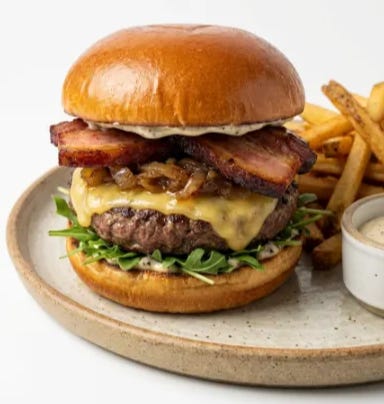
Step 1: Create the Base Image (Your First Frame)
The most important part of any Veo 3 video is the first frame.
If your first frame looks professional, your final video will look professional.
We’ll generate this image inside mitte.ai.
Settings
Model: Nano Banana Pro
Aspect Ratio: 2:3 (important—use this for all images)
Background: Clean and simple
Prompt
Make an image of a realistic burger that looks like it came from a high-end restaurant.
Use a plain white background.
Soft studio lighting.
Sharp focus.
High detail.
Professional food photography style.
This image will become the starting point of your animation.
Step 2 (Optional): Clean the Scene
If your burger image contains:
A plate
Fries
Sauce splashes
Unwanted props
You can remove them by editing the image with Nano Banana Pro on mitte.ai:
Prompt:
remove the plate, fries and sauce, center the burger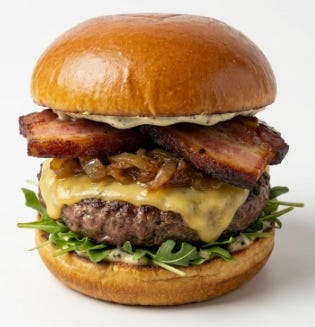
Why this matters:
Exploded-view videos look best when:
The background is clean
The main object is isolated
There are no distractions
This makes the animation more readable and professional.
Step 3: Create the Exploded Ingredients Image
Now we generate the final frame of the video:
The burger separated into layers, floating, with labels.
This is what Veo 3 will animate toward.
Prompt
Make an image of a burger exploded into its individual components.
Each ingredient should float above the next in correct order.
Add a text label for each ingredient.
Match the label color to the ingredient color.
Clean white background.
Minimalist infographic style.
High detail.
Professional food illustration look.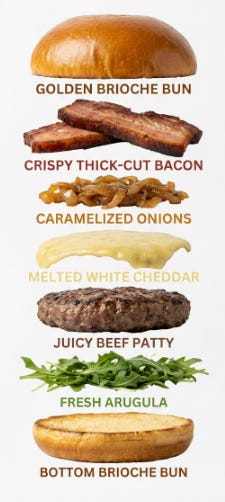
You should now have:
✔ Image 1: Full burger
✔ Image 2: Exploded ingredient layout with labels
These two images will define your entire video.
Step 4: Animate with Veo 3 (Image → Video)
Now the magic happens.
Go to mitte.ai and select:
Model: Veo 3 (Image → Video)
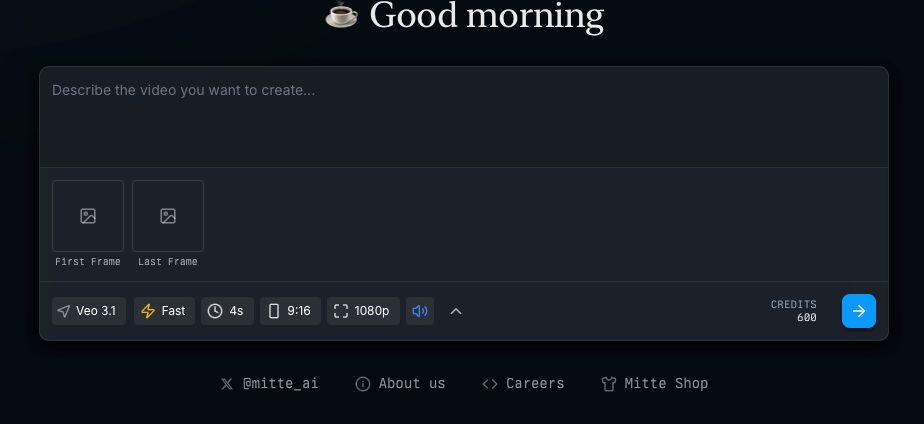
Upload
First Frame: The full burger image
Last Frame: The exploded ingredients image
Settings
Length: 4 seconds
Aspect Ratio: 9:16 (for TikTok, Shorts, Reels)
Speed: Fast or Normal
Style: Clean, smooth
Prompt
Smooth cinematic transition from a complete burger into an exploded ingredient view.
Each layer gently separates and floats upward.
Soft, natural motion.
No shaking.
No distortion.
No flickering.
Negative Prompt (Important!)
blurry, shaky, distorted layers, unreadable text, messy motion, bad lighting
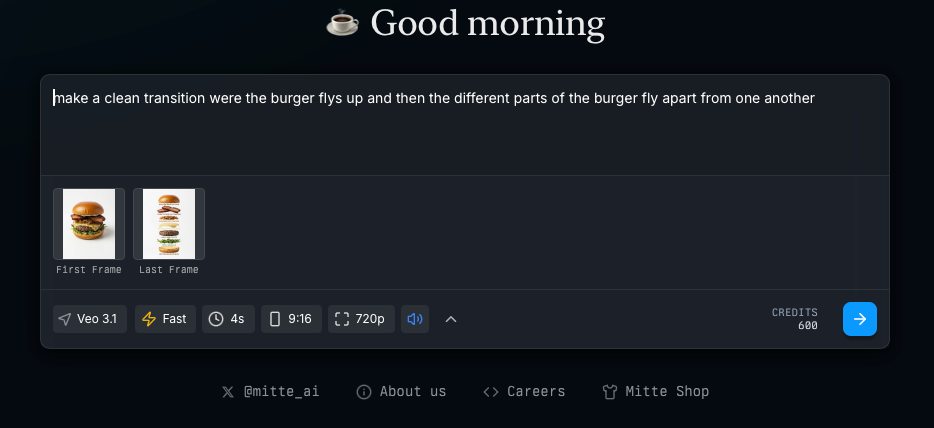
Click the blue generate button.
Why This Workflow Works
Most people try to describe everything in one text prompt.
That doesn’t work well.
Professionals use structure:
Control the first frame
Control the final frame
Let Veo animate the transformation
This gives you:
Predictable results
Cleaner motion
Professional composition
Fewer failed generations
This is why mitte.ai is perfect for this workflow—you can generate, edit, and animate everything in one place.
Final Result
After following these steps, here’s our final video:
You can see:
Clean animation
Smooth separation
Clear labels
Professional look
This is exactly the type of content brands, restaurants, and creators love.
Pro Tips
Keep it Short
Exploded-view videos work best between 3–6 seconds.
Use White or Neutral Backgrounds
This makes the labels easier to read and the motion clearer.
Use Color-Matched Text
Matching text color to ingredient color makes the video more intuitive.
Always Use Image → Video
Never rely on text-only prompting for these styles.
Why I Recommend mitte.ai for This
mitte.ai makes this workflow simple:
✔ Multiple image models
✔ Advanced editor
✔ Clean UI
✔ Precise control
✔ Image → Video pipeline
✔ Professional results
You don’t need to jump between five tools.
Everything happens in one place.
Want More Tutorials Like This?
In the next posts, I’ll show you how to make:
Exploding drink videos
Skincare ingredient breakdowns
Tech product breakdowns
Assembly-style animations
Menu animations
If you want those, subscribe and stay tuned.
Now go create something delicious 🍔✨